Showing posts with label Arduino. Show all posts

Monday, August 19, 2024

Learning CW in the 21st Century

As mentioned in a previous post, I'm wanting to get my CW up to a reasonable level, for actual on-air use. 

When I first went for my ‘Full Call’ in the late 80s, I was greatly indebted to Rod (VK6BRH) (now SK) who ran CW practice sessions on one of the local Perth repeaters.  Each week I would tune in and Rod would send CW at various speeds.  A group of us (with Limited Z or Novice Calls) would report in and share our progress (or lack thereof). But that was then, and this is now!

Today we have the interweb thingy and that has changed almost everything, including how to learn CW.  There are several Web based sites that seek to assist in receiving, and the one recommended to me is called ‘Morse Code World’’, its URL is simply: -  https://morsecode.world/ .

On this screen you can set the characters you wish to work on and some other settings. further down thee page you can set the character speed etc...


This site is great for practicing receiving, (as are a number of other tools and phone apps).  

To practice sending there wasn't much around, at least not until fairly recently.  On doing a web search a few weeks back I found two sites that are setup for two-way CW conversations over the net. The first is called VBand (Virtual CW Band) it can be found at https://hamradio.solutions/vband/. The second site is called Vail and is at https://vail.woozle.org/#. However, I'll just mention VBand for now.

VBand has a several channels on which you can conduct QSOs with other on over the net.  The Practice Channel does not TX over the net but only decodes locally.  You can however conduct a QSO with a bot.

You can turn the bot on in the settings tab, (where you can also set the speed and tone, etc). Then you simply call CQ or send something to activate it. QSOBot will respond and attempt to carry out a standard QSO.

It is at this point that you will be asking the question, ‘how do I connect my key or paddle to the computer’. Fair question.


Firstly, if you are using a smart phone, tablet or iPad you can enable the ‘Touch Pad’ option. (This option is available on both the VBand and Vail sites.) However, I would recommend using a real key or paddle and then interface these to the computer.

There are adapters that you can buy from eBay and several other online outlets, but I also found some code to make my own. All that is required is an Arduino or something similar.  I had an AtTiny85 in stock and with a bit of modification to the code, I had it up and running in no time.    The AtTiny85, once programmed, simply acts like an external keyboard, that sends a ‘[‘ for a Dit and a ‘]’ for a Dah.  The paddle (or key) can be connected directly to the board, with no other components required!


Well, that's a short introduction to my latest project and challenge.  Maybe we will see you on-air or maybe on the net.


73 de VK8MT


Links to Internet CW repeaters and Code


Note: I mashed the two lots of code together to create my own.


Tuesday, September 08, 2020

Antenna Rotator - Update

Way back in a post on the 5 April 2019, (wow, a lot of water has gone under the bridge since then) I provided my first update on an Azimuth and Elevation Rotator project that I was working on.  There were two options for code available at the time, one from Anthony Good K3NG and one from the School Amateur Radio Club Network (SARCNET), the latter from Victoria, Australia.  I decided to build the SARCNET rotator but in such a way that I could switch to the K3NG code if desired.  That time is nigh approaching.   

There have been some very good advancements with the K3NG code, two in particular.

These features are very significant as I would no longer need to use a PC or Pi to deal with the satellite tracking, the rotator, itself, can store up to 34 sets of satellite data  (TLE).  

The Nextion display is a great way of accessing the additional features without adding extra buttons and switches, thus saving on front panel real-estate.

The display has been ordered.


Adam, VK4GHZ has been busy enhancing the display, See above! As Adam states, 'LCDs and switches are so last decade!'

Keep an eye out for an update once we have the shack up and running again.


Saturday, October 05, 2019

Multi Frequence CW Beacon

A few years back (2015)  Anthony, K3NG published code for a Yaesu FT-817 Arduino Controlled Beacon.  Although not polished or documented, I decided to give it a go, and learn a thing or two in the process.  The code can be found here

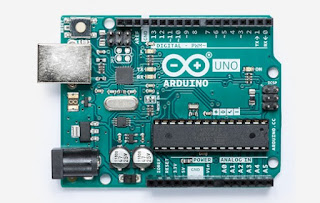
After some tweaks we have the code side of things up and running.  It's amazing what you can do with an Arduino Uno.

https://www.arduino.cc/

Watch this space.


Tuesday, June 11, 2019

CW Keyer

Over the last few months I have used up some parts that were taking up space, and or just not being used.  So decided to build a CW Keyer using the code provided by K3NG. This with a spare Arduino Nano and other bits in stock and it all came together nicely.

It has 5 memories and can switch between two Transceivers.


Saturday, April 06, 2019

Azimuth and Elevation Rotator - Part 2


After some setup issues the rotator and Gpredict on the Raspberry Pi are now talking to each other.  All that remains is for the electronics to be tidied up, some mechanical work to be completed and then to work out how to mount it, on either a speaker stand or tripod.


Friday, April 05, 2019

Azimuth and Elevation Rotator - Part 1

Over the last few weeks I’ve been spasmodically working on a rotator for my Arrow 2m/70cm (satellite) antenna.  There are two sources of code available that will accomplish what I’m hoping to achieve. One from Anthony Good K3NG (no relation that I’m aware of) and the other is from much nearer to home.

The code that I’m currently using is from Julie VK3FOWL and Joe VK3YSP.  They seem to be heavily involved in the School Amateur Radio Club Network (SARCNET), which has comprehensive build instruction for the Mini Satellite-Antenna Rotator (in several versions).  As is generally the case, I have deviated a little from their plans by using a Arduino Uno rather that a Arduino Pro Micro Board.

The most expensive single component so far is the case (at $34).  The software has several menu items that allow you to test and calibrate the unit. And you can also manually control it by entering the AZ and EL (in degrees with a space between them).  You do this with a RS232 (TTL levels) interface to a PC running a terminal program like Putty or the equivalent on a Raspberry Pi.

One issue was that the USB to TTL fob that I was using, did not drive the Uno RX pin to ground (but only down to about 2.5v).  The RX and TX pins on the Uno are also used for the USB connector and so the RX input requires a little additional encouragement to pull it to Ground. (Note: this would not have been a problem if I had used the Arduino Pro Micro Board.)  I added a couple of  FETs (2N7000) with resistors (10k)  to get the +5 to 0 volts swing required.

Once the mechanical work is completed, I’ll use a Pi running Gpredict ver. 1.4 (already tested) to track the satellites and send the AZ and EL data to the rotator.  Gpredict can also control the radio (taking into account the doppler shift).  At least that what I’m aiming for!  So watch this space!


Note: - In the video, I firstly entered '270 0' before entering '270 45'. You can see this as the rotator does not start to elevate until the second entry is made.


Links

Tuesday, March 05, 2019

K3NG Arduino Rotator Controller

I thought I'd make a Rotator Controller for my 2m/70cm Arrow antenna.  There were a couple of options and I'm gleaning information from a number of sources. K3NG has some great Arduino Projects and so I've decided to use his code and some hardware options from closer to home (see SARCNET).

We have made a start with surplus parts, and more are on order from eBay.  OK, it's early days, but watch this space.


VK8MT Status (Last 3 hours)